What Is Technical SEO? The Best Guide For Business Owners
Posted on
- 13 May 2026
Technical SEO: A Simple Guide for Australian Businesses
Here’s something a lot of business owners find out the hard way: you can write excellent content, have great Google Ads management, and still be invisible in search. It doesn’t make sense on the surface. But the cause, more often than not, is technical SEO. Or rather, the lack of it.
This is the part of SEO nobody really talks about because it’s not glamorous. There’s no clever headline strategy or viral hook angle here. It’s infrastructure. And just like plumbing in a building, nobody cares about it until it stops working.
So let’s go through what technical SEO actually is, why it shapes where your website sits in Google, and what Australian businesses of any size should be paying attention to.
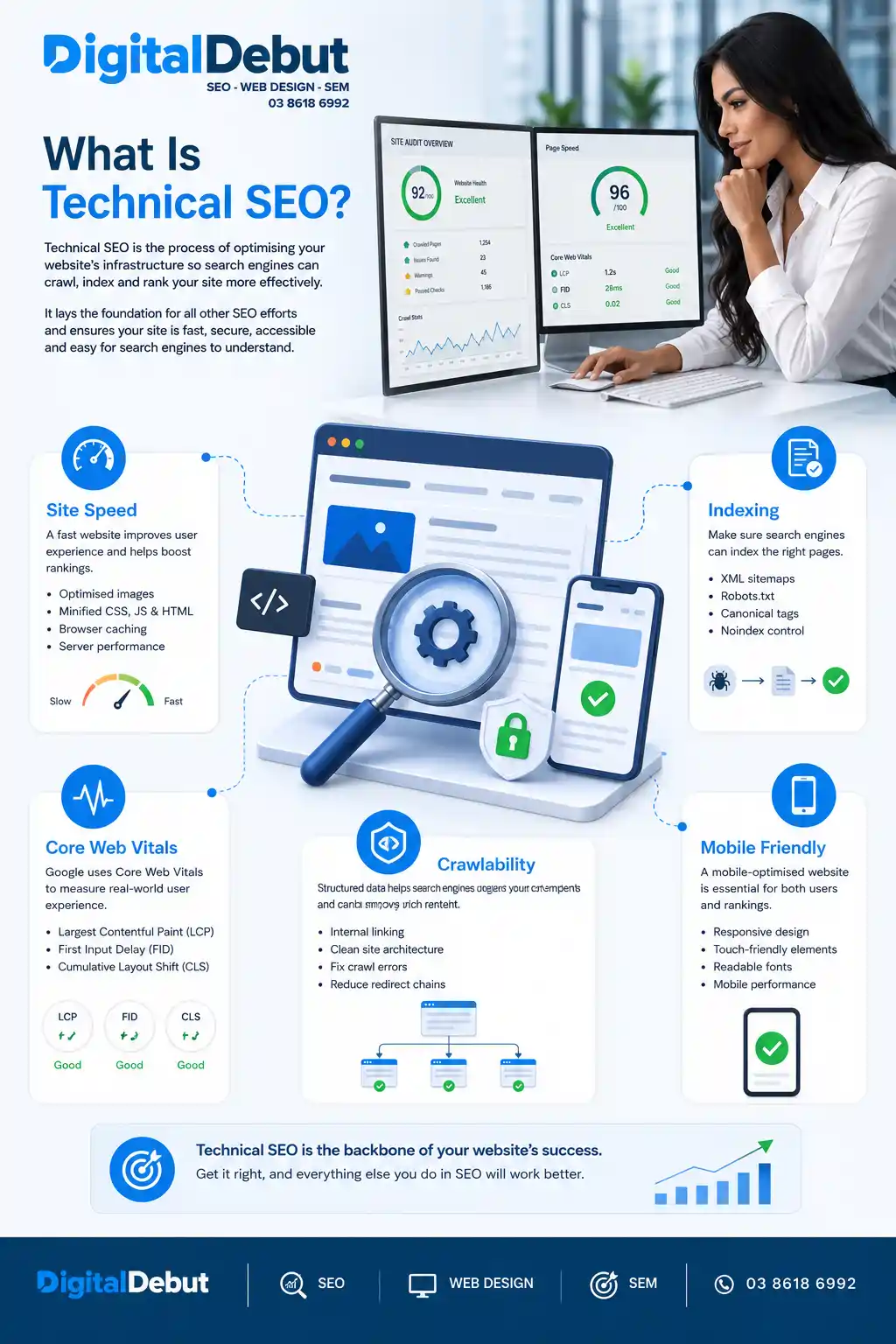
Table of Contents
What Does Technical SEO Mean?
Technical SEO is about how your website is built and how search engines experience it. It covers things like load speed, site structure, mobile usability, security, and how easy it is for Google’s crawlers to move through your pages.
It has nothing to do with your content. Nothing to do with how many keywords you’ve used or how many backlinks you have. Those things matter, but they’re built on top of the technical layer. If the technical layer is broken, everything else is fighting uphill. Your SEO company must be on top of these things!
Search engines send automated programs, often called crawlers or spiders, to visit websites and collect information. Those programs feed data back into the search index, which is what Google uses to decide what to show you when you search. Technical SEO makes sure those crawlers can find every important page, understand it clearly, and trust that the website is well-maintained.
When something goes wrong technically, pages disappear from results. Rankings drop in ways that are hard to explain. Traffic dries up. And because the problems are hidden, they can run for months before anyone figures out what’s happening, putting stress on both you and your digital marketing company.
Why Most Businesses Often Miss This
The short answer: it’s invisible. You look at your website, it looks fine. The images load. The contact form works. The fonts are on brand. Everything seems okay.
What you’re not seeing is whether Googlebot hit a redirect loop trying to reach your services page. Or whether your site loads in 6.4 seconds on a mobile device in Ballarat. Or whether half your blog posts are flagged as noindex by accident.
Most businesses only discover technical problems after a ranking drop. And by then, the issue might have been quietly doing damage for a long time. Running a regular audit and checking Google Search Console monthly takes maybe an hour per month. The cost of missing something, on the other hand, can be months of lost visibility and the time it takes for rankings to recover.
Core Web Vitals: Google's Official Performance Check
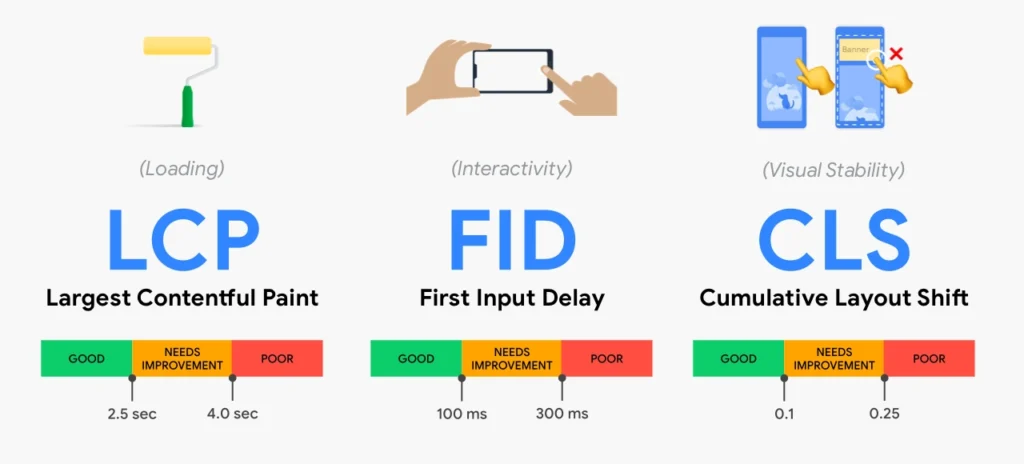
A few years back, Google formalised a set of user experience signals called Core Web Vitals and started using them as ranking factors. There are three of them.
- Largest Contentful Paint: This measures how quickly the main content of a page becomes visible to someone loading it. Google’s benchmark is 2.5 seconds. Go over that and you’re in trouble.
- Interaction to Next Paint: This one measures how fast your site responds when someone clicks or taps something. Nobody waits around for a sluggish site on their phone.
- Cumulative Layout Shift: You’ve experienced this even if you didn’t know the name. It’s when a page finishes loading, you go to tap a button, and then something above it loads, and everything shifts down, and you tap the wrong thing. It’s infuriating. Google tracks it because it reflects a poor experience.
Poor scores across these three signals tell Google that people do not enjoy using your site. Good scores, combined with a properly structured site and strong content, start to compound into meaningful ranking advantages over competitors who are ignoring this entirely.
Site Architecture: How You Organise Everything
The way your website is structured sends real signals to Google about what’s important and how your content relates. A well-organised site makes it easy for crawlers to move through logically. A messy one wastes their time and buries important pages.
Good architecture is hierarchical. Your homepage at the top. Main service or category pages below that. Individual posts, location pages, and subcategory content below those. A solid rule: no page that matters should take more than three clicks to reach from the homepage. The further something is buried, the less crawl time Google tends to allocate to it.
URLs are part of this:
A clean URL like: /info-hub/what-is-technical-seo/ tells both users and crawlers exactly what the page is about.
A URL that looks like: /page?cat=3&id=4738 tells nobody anything and earns no goodwill from Google.
Crawlability and Indexation: Can Google Find Your Pages?
This is where a lot of websites quietly fail. Before Google can rank a page, it has to do two things: crawl it and index it. Crawlability is whether Googlebot can get to the page at all. Indexation is whether Google decides to include it in search results.
Problems that break crawlability tend to be things like a misconfigured robots.txt that blocks important sections of the site, or broken internal links that lead crawlers to dead ends, or server errors that return failure codes instead of content. Problems that block indexation are often simpler: a noindex tag that’s been applied to the wrong pages, or pages that exist but have never been linked to from anywhere else on the site.
Google Search Console’s Coverage report is the fastest way to see what Google is and isn’t indexing on your site. It’s free, it’s direct from the source, and most business owners who check it for the first time are surprised by what they find.
Mobile-First Indexing: This Is Not a 2018 Concern Anymore
Google uses the mobile version of your website as its primary basis for ranking. Not the desktop version. The mobile version. This is not new, but a significant number of Australian businesses are still building and maintaining their websites as if only desktops matter.
Most searches happen on phones. For many industries, the figure is well above 60 percent. If your site is technically fine on a laptop and painful to use on an Android mid-range device with regular mobile data, you’re losing both rankings and customers at the same time.
Mobile friendliness is about more than responsive design. It includes font sizes that don’t require zooming, tap targets large enough to hit reliably, no horizontal scrolling, and page load times that are acceptable over a 4G connection. If you are working with a web design company on a new website, make sure mobile performance is treated as a first-class requirement, not an afterthought addressed on the last day before launch.
HTTPS: Your Baseline Security Signal
If your website still loads on HTTP rather than HTTPS, Chrome will show visitors a “Not Secure” warning before they see anything you’ve written. That warning erodes trust immediately. It also represents a missed ranking signal, because Google confirmed HTTPS as a positive factor back in 2014.
Getting an SSL certificate set up is usually quick and often included in modern hosting packages. The more common problem is when businesses migrate from HTTP to HTTPS without properly redirecting all the old URLs. When that happens, you end up with duplicate versions of your site, split link signals, and potential indexation confusion that can persist for months.
It’s worth noting that your hosting setup matters here too. Cheap or poorly maintained hosting frequently introduces security and performance issues that directly affect both user experience and rankings.

XML Sitemaps and Robots.txt: Small Files, Big Consequences
Your XML sitemap is essentially a roadmap of your site submitted directly to Google through Search Console. It lists every important URL, how often it changes, and how it relates to other pages. For a small site with good internal linking, it’s nice to have. For anything with dozens of pages or more, it’s genuinely useful and worth maintaining properly.
The robots.txt file tells crawlers where they can and can’t go. Used correctly, it prevents bots from wasting time on internal search results, staging environments, and other low-value content. Used incorrectly, it blocks crawlers from the pages you actually want to rank. Mistakes happen particularly often after website migrations or platform changes when an old robots.txt from a staging environment gets pushed live by accident.
Both files are small, easy to check, and surprisingly consequential. Include them in any technical review.
Duplicate Content and Canonical Tags
Duplicate content is exactly what it sounds like: the same or very similar content appearing at more than one URL. Google does not know which version to rank. The typical result is that neither version ranks well, and any authority pointing at those pages gets spread thinly across duplicates instead of supporting the one you care about.
It happens for reasons that are nobody’s obvious fault. Ecommerce platforms generate multiple product URLs based on filter selections. WordPress creates archive pages that partially duplicate blog content. Sites accessible on both the www and non-www versions, without a redirect resolving them to one, have a duplication issue sitting at the root of the entire domain. It will be worth asking your ecommerce SEO marketing team when was the last time they did a technical audit of your website.
Canonical tags are the standard solution. Added to a page’s HTML, they point to the definitive version of that URL and tell Google to consolidate all signals there. It’s a straightforward fix that many sites simply don’t have in place.
Structured Data: Giving Google More to Work With
Structured data is code added to your pages that helps Google understand your content at a more precise level. Using Schema.org vocabulary, you can tell Google that you’re a local business, list your address and phone number, flag your opening hours, display review ratings, describe your products, and more.
When Google has this detail, it can show richer results. Those rich results include star ratings beneath your link, FAQ dropdown sections, product prices, and event information. They stand out visually and tend to attract more clicks than plain results even when they’re not in first position.
For Australian businesses with a local footprint, implementing Local Business schema strengthens the connection between your website and your Google Business Profile. It reinforces to Google precisely what you do and where you do it, and when layered on top of consistent name, address, and phone information across other platforms, the visibility gains in local results are real.
Internal Linking: How Google Navigates Your Site
Every link from one of your pages to another of your own pages does two things. It helps users find related content. And it signals to Google which pages are important, passing authority from one URL to another in the process.
Pages with no internal links pointing to them are orphan pages. Crawlers rarely find them. If you have a service page on your site that no other page ever links to, it is effectively invisible to search engines regardless of how relevant and well-written it is. That’s a fixable problem, but you have to know it exists first.
A deliberate internal linking strategy keeps your important pages connected and well-supported. It also keeps readers moving through your site instead of bouncing. Both outcomes feed back into the signals Google uses to assess whether your site deserves to rank. The post on top SEO tips for your website covers the practical side of this well if you want to go deeper.
Common Technical SEO Mistakes That Hurt Rankings
Launching a redesigned website without a proper SEO site migration plan is genuinely one of the most damaging things a business can do to its own search visibility. When URLs change and old ones aren’t redirected, years of accumulated authority gets dropped. Pages that were ranking well simply vanish. Recovery takes months, sometimes longer.
Ignoring page speed until the consequences arrive is another pattern that comes up constantly. Businesses get used to their own site’s load time because they check it daily on fast broadband. Their customers are checking it once, on a phone, and they will leave. Getting your WordPress site running faster than it currently is usually achievable without a full rebuild, and the payoff in both rankings and conversion rate tends to justify the effort.
Treating technical SEO as a project with an end date is also a mistake. Websites change constantly. Each plugin added, page moved, or content restructured has the potential to introduce new issues. Monthly monitoring and an annual proper audit catches problems early. Waiting until something breaks means recovering from something preventable.
Technical SEO and Web Design Need to Start Together
The best outcome happens when technical requirements are part of the website design brief from the beginning. When a site is built with technical SEO in mind, clean code, a logical URL hierarchy, compressed images, semantic headings, and mobile performance are built in from the ground up. They’re not retrofitted.
When those considerations are ignored during a build and addressed later, you’re working around structural decisions that were never made with SEO in mind. The result is more expensive and less effective.
A good web design and development company treats technical SEO as part of the development specification, not an optional upgrade. If you’re planning a new site and the agency you’re talking to isn’t asking about SEO requirements upfront, that’s worth noting.
Where to Start With Technical SEO?
You don’t need to tackle everything at once. Start with what’s free and accessible.
Open Google Search Console and check the Coverage report. See which pages are indexed and which have been flagged with errors. Run your website through Google PageSpeed Insights on mobile. Load your website on your phone, not your laptop, on regular mobile data, and experience it the way your customers do.
Those three steps will surface the most significant issues on most websites within an hour. Some of what you find will require a developer to fix. Some of it you’ll be able to act on immediately. Either way, knowing what’s there is the first step.
You can also look at our SEO audit checklist to see what you may be missing. This also covers your on-page SEO, which is equally as important as the technical side of things.
If you’d rather have an experienced team run a proper audit and work through the issues correctly, the Digital Debut team does exactly this for Australian businesses across a wide range of industries and sizes. Reach out today and let’s have a look at what’s holding your site back.

Technical SEO FAQ's
What is the difference between technical SEO and on-page SEO?
Technical SEO covers the infrastructure of your website: how it’s built, how fast it loads, how secure it is, and how search engines navigate it. On-page SEO covers the content side of individual pages: headings, keywords, meta descriptions, and internal links. Both matter and both feed into rankings, but they work on different layers of the site.
Does a new website need technical SEO right away?
Yes, and ideally it needs it before the site goes live. Building a site with the technical foundations correct from the start is easier and cheaper than diagnosing and fixing structural problems after the fact. A technically clean launch gives new content the best chance of getting found quickly.
How do I find out if my site has technical SEO problems?
Google Search Console is the best free starting point. The Coverage report shows you directly which pages Google is and isn’t indexing and why. Google PageSpeed Insights will show you performance issues on both mobile and desktop. Neither tool requires technical expertise to read at a basic level.
How regularly should a technical SEO audit be done?
If you have a team that knows what they are doing, once a year is a reasonable baseline for most businesses. You should also audit immediately after any significant website change, whether that’s a redesign, a platform migration, a major restructure, or a new functionality rollout. Problems introduced during website changes can take months to show their impact if nobody’s checking.
Does site speed actually affect Google rankings?
Yes. Google made page speed an official ranking signal for mobile in 2018 and has since incorporated Core Web Vitals as additional performance factors. Beyond rankings, a faster site converts better because visitors are less likely to give up and leave before the page loads.
What is the robots.txt file actually for?
It tells search engine crawlers which parts of your site they are and aren’t allowed to access. Its purpose is to prevent crawlers from spending time on low-value pages. Its risk is being misconfigured in a way that accidentally blocks important pages from being crawled. It’s a simple file worth checking regularly, particularly after a site rebuild or migration.
When do I need canonical tags?
Whenever the same or similar content exists at more than one URL on your site. This is more common than people realise, especially on e-commerce sites, sites built on WordPress, or any site accessible on both www and non-www versions. Canonical tags consolidate the ranking signals to your preferred URL and prevent duplicate content from diluting your results.
Can I handle technical SEO without a developer?
Monitoring and basic diagnostics, yes. Google Search Console, PageSpeed Insights, and mobile testing are all accessible without coding knowledge. Actually fixing many technical issues, like implementing structured data, resolving crawl errors, or improving Core Web Vitals scores, typically requires development skills. Working with a professional for the implementation part tends to produce better outcomes faster.
How does technical SEO affect local search results?
Technical SEO provides the foundation that local visibility builds on. A technically clean, fast, crawlable site gets indexed more efficiently, which means your location pages and service area content are discovered and ranked more effectively. Adding Local Business schema reinforces your connection to your Google Business Profile and to the geographic area you serve.
What is crawl budget and does it apply to my business?
Crawl budget is the number of pages Googlebot will crawl on your site within a given timeframe. For small sites, it’s rarely a concern. For large e-commerce stores or content-heavy platforms with thousands of pages, wasted crawl budget on thin or duplicate content can mean important pages go undiscovered. If your site has several hundred pages or more, it’s worth considering how your crawl budget is being spent.