What Is On-Page SEO? A Practical Guide for Business Owners
Posted on
- 4 June 2026
The Best Guide For On-Page SEO
Most business owners have heard the term ‘on-page SEO’. Few actually know what it covers. And even fewer are doing it well.
On-page SEO is the practice of optimising the content and structure of individual web pages so Google understands what they are about and decides they deserve to rank. It is the most direct control you have over your search visibility. Every word, heading, link, and image tag on your website is either helping or hurting your rankings.
This guide breaks it all down. What on-page SEO actually means. Why it matters for Australian businesses. What the key elements are. And where most websites are getting it wrong.
Table of Contents
On-Page SEO: The Simple Definition
Here is the clearest way to explain it. SEO has three broad categories.
Technical SEO
The Foundation: Technical SEO ensures Google can crawl and index your site without problems.
Off-Page SEO
The Reputation: Off-page SEO builds your site's authority through backlinks from other websites.
On-Page SEO
The Message: On-page SEO tells Google what each page is actually about.
If technical SEO is the foundation and off-page SEO is the reputation, on-page SEO is the message. It is the part that answers the question Google is always asking: Is this page genuinely the best result for this search query?
When your on-page SEO is strong, Google can read your pages accurately, match them to the right searches, and rank them with confidence. When it is weak, even a technically flawless website with strong backlinks will underperform.
Why Any Business Cannot Afford to Ignore It
Local search competition has intensified sharply over the past few years. Regardless of your industry, more businesses are actively investing in digital marketing than ever before. If your pages are not optimised, you are handing visibility to competitors who are.
Here is the part that makes on-page SEO especially valuable. Unlike Google Ads, it does not switch off the moment your budget runs out. A well optimised page can hold its ranking and continue bringing in enquiries for months, even years depending on how much authority and relevance that page has to user search.
For businesses targeting customers in specific locations, on-page optimisation is also the foundation of strong local SEO services. When your service pages are properly built around suburb and city specific terms, your chances of appearing for local searches improve significantly.
The On-Page Elements That Actually Imporove Rankings
Not all on-page factors carry the same weight. Here is a breakdown of the ones that genuinely matter today
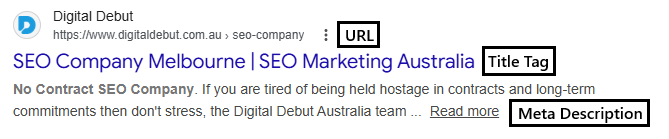
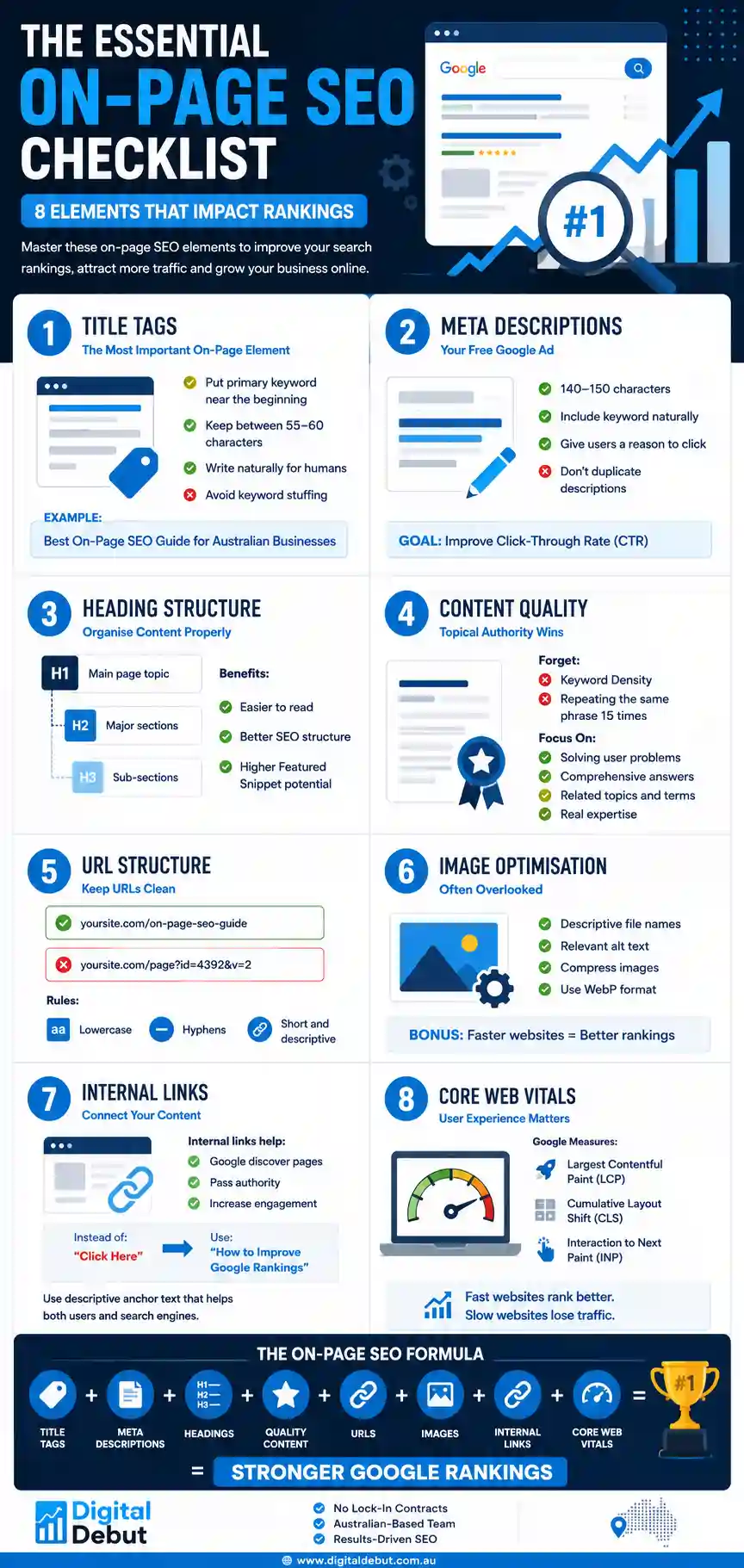
Title Tags: The title tag is the blue clickable link that appears in Google search results. Apart from the URL, it carries more ranking signal than almost any other on-page element. A good title tag puts the target keyword towards the front, stays between 55 and 60 characters, and reads like a real sentence rather than a list of keywords. One common mistake: stuffing multiple keywords into a single title. Google often rewrites these automatically as they look spammy to people browsing search results. Clear and specific beats clever and cluttered every time.
Meta Descriptions: Meta descriptions do not directly affect rankings. They do, however, affect whether someone clicks on your page at all. Think of them as a two-line advertisement. They should sit between 140 and 150 characters, include the keyword naturally, and give the searcher a clear reason to choose your result over the others on the page. Every page needs its own unique meta description. Generic or duplicate descriptions are a missed opportunity at a moment when you actually have the person’s attention. Google often rewrites these based on user search and what’s on your website.
Heading Structure: Headings organise your content for both humans and search engines. The H1 is the main heading and should only appear once per page. It needs to include your primary keyword and clearly describe what the page covers. H2 headings break the content into sections. H3 headings add further depth within those sections. A logical heading structure does two things. It makes your content easier to read and navigate for users. And it increases your chances of appearing in featured snippets, People Also Ask results, and other SERP features that dominate the top of the page.
Content Quality and Semantic Relevance: This is where many business owners still get it wrong. Keyword density is a relic. Stuffing a keyword into a page fifteen times will not make it rank. Google’s algorithms have moved well past that. What actually works is writing content that comprehensively addresses the user’s question. That means covering the topic in genuine depth, using related terms and phrases naturally throughout the text, and demonstrating real knowledge of the subject. Google calls this topical authority, and it is one of the most important signals in modern search ranking. Knowing which topics to write about starts with understanding what people are searching for. Our guide on how to do keyword research walks through the process in practical terms for Australian businesses.
URL Structure: A clean URL does two things well. It tells the user what they are about to see before they click. And it gives Google an additional signal about the page’s subject. Keep URLs lowercase, use hyphens to separate words, and cut any unnecessary words or parameters. A URL like /best-on-page-seo-guide/ is clear, shareable, and keyword-relevant. A URL like /page?cat=seo&id=4392&v=2 is none of those things.
Image Optimisation: Images are frequently overlooked in on-page SEO, which is a real shame because they create multiple optimisation opportunities. File names should describe the image in plain English, not reflect the camera’s default naming. Alt text should accurately describe what the image shows (recommended for the main images as too much can cause overoptimisation issues) And file size matters too. Oversized images slow down your pages, and page speed is a confirmed ranking factor. Compress before you upload. Use WebP format where your platform supports it.
Internal Links: Every piece of content on your site should link to other relevant pages within the same site. Internal links do three useful things: they help Google discover and crawl pages it might otherwise miss, they pass ranking authority from stronger pages to newer ones, and they keep users moving through your site rather than bouncing immediately after reading one page. Use anchor text that actually describes the destination. “Click here” tells Google nothing, but an anchor text like “should I do Google Ads or SEO for rankings?” tells Google quite a lot.
Speaking of which, if your rankings are a concern, our small post on how to improve your Google ranking is worth a read alongside this one.
Core Web Vitals and Page Experience: Google’s Core Web Vitals measure the real-world experience of loading and using your pages. Largest Contentful Paint measures how quickly the main content loads. Cumulative Layout Shift measures visual stability as the page loads. Interaction to Next Paint measures how quickly the page responds to user input. Poor scores here will hold your rankings back, even if your content is excellent. This is the point where on-page and technical SEO overlap most directly. A page that loads slowly or jumps around while loading is a bad experience, and Google will rank it accordingly.
For some more amazing fast tips, check out our vlog on the best things to optimise as soon as you start SEO.
On-Page SEO vs Off-Page SEO: Getting the Balance Right
The distinction between on-page and off-page SEO causes a lot of confusion, so let’s make it simple.
On-page SEO is everything within your control on your own website. Off-page SEO is primarily the links other websites point to yours. Those links act as votes of confidence, signalling to Google that your content is trustworthy and worth ranking.
You need both. A page with strong on-page optimisation but no backlinks will struggle to rank for competitive keywords. A page with strong backlinks but poor on-page SEO will underperform because Google cannot clearly match it to specific searches.
The businesses that get the best results treat these two things as complementary priorities rather than alternatives. If you want a clearer picture of what your website needs across both areas, talking to a qualified SEO company like ours is often the fastest way to get an honest assessment.
The Most Common On-Page SEO Mistakes We See
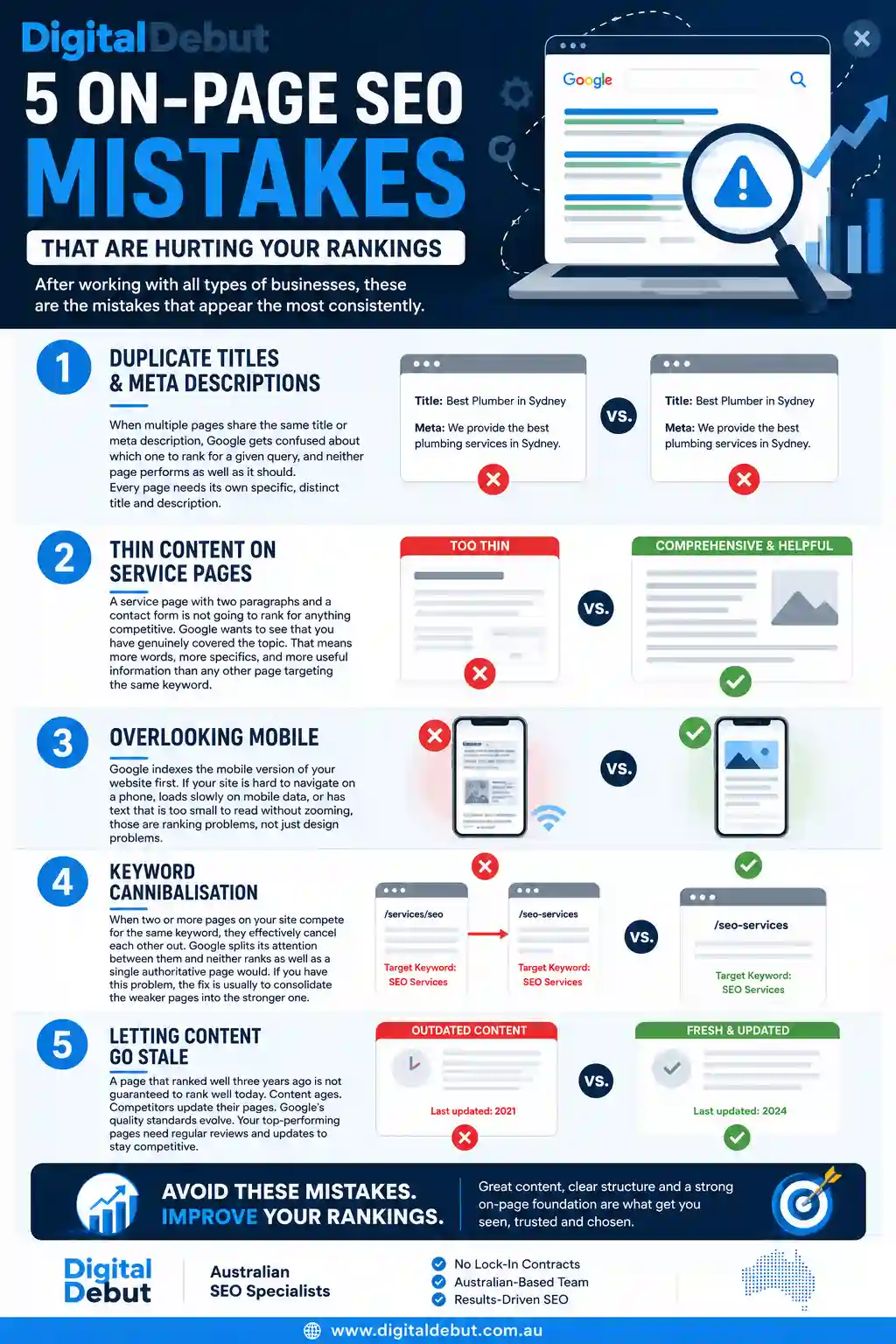
After working with all types of businesses, these are the mistakes that appear the most consistently.
Duplicate Titles and Meta Descriptions: This is extremely common on websites built quickly or with limited attention to SEO. When multiple pages share the same title or meta description, Google gets confused about which one to rank for a given query, and neither page performs as well as it should. Every page needs its own specific, distinct title and description.
Thin Content on Service Pages: A service page with two paragraphs and a contact form is not going to rank for anything competitive. Google wants to see that you have genuinely covered the topic. That means more words, more specifics, and more useful information than any other page targeting the same keyword.
Overlooking Mobile: Google indexes the mobile version of your website first. That means your mobile experience directly determines your rankings, not your desktop version. If your site is hard to navigate on a phone, loads slowly on mobile data, or has text that is too small to read without zooming, those are ranking problems, not just design problems.
Keyword Cannibalisation: When two or more pages on your site compete for the same keyword, they effectively cancel each other out. Google splits its attention between them and neither ranks as well as a single authoritative page would. If you have this problem, the fix is usually to consolidate the weaker pages into the stronger one.
Letting Content Go Stale: A page that ranked well three years ago is not guaranteed to rank well today. Content ages. Competitors update their pages. Google’s quality standards evolve. Your top-performing pages need regular reviews and updates to stay competitive.
How to Audit Your On-Page SEO Without a Specialist
You do not necessarily need a professional to identify on-page issues. Here is a practical starting point.
Set Up Google Search Console: Google Search Console is free and shows you which search queries are bringing users to your site, which pages are getting impressions but not clicks (a title or meta description problem), and any issues Google has flagged with crawling or indexing. It is the single most useful tool available for on-page SEO intelligence. Note: Google Search Console is not that accurate, but it helps you understand your content a bit better.
Use a Crawl Tool: Tools like Screaming Frog (free for sites under 500 URLs) will scan your entire website and flag missing title tags, duplicate content, broken internal links, pages with no alt text, and dozens of other common issues. Running a crawl once every quarter gives you an ongoing picture of your site’s on-page health.
Manual Page Checks: For smaller sites, nothing beats going through each page one by one. Look for: a unique title tag with the page’s keyword, a unique meta description, a single H1 heading, a logical heading structure below that, enough content to genuinely answer the page’s topic, at least two internal links to related pages, images with descriptive alt text, and a clear call to action.
It is worth understanding how long SEO really takes before you start so your expectations are grounded. On-page changes typically become visible in rankings within four to twelve weeks, depending on your site’s history and how often Google crawls your pages.
On-Page SEO for Local Businesses
If you run a local service business, your on-page priorities look slightly different from a national retailer. Here is what to focus on.
Dedicated Location Pages: If you serve multiple areas, each location deserves its own page built specifically around that area. A single “Melbourne plumber” page will not rank well for searches in Malvern, Northcote, or Williamstown. Individual pages with genuinely unique content for each area perform significantly better. It is important to understand these suburb pages needs to be done very carefully or they may do more harm than good. A standard template with the suburb name swapped in is not unique content. Google has seen thousands of those pages and treats them accordingly. We have also made a vlog about how to add suburb pages as part of your SEO strategy so please check it out for a better understanding.
Consistent Business Information: Your business name, address, and phone number need to appear consistently across your website and match what is listed on your Google Business Profile. Inconsistencies confuse Google and can hurt your visibility in local map results. This is an often-overlooked element of Google My Business SEO that has a real impact on local rankings.
Local Schema Markup: Schema markup is structured data added to your page code that explicitly tells Google specific facts about your business including your address, opening hours, reviews, and services. For local businesses, LocalBusiness schema is particularly valuable because it makes your information available for rich results and local knowledge panels in Google Search.

Web Design and On-Page SEO Are Not Separate Things
This is a point that gets missed a lot. On-page SEO and web design are deeply connected. A site built with SEO in mind naturally has clean heading structures, fast load times, logical navigation, and content that is easy for Google to parse. A site built without any SEO consideration typically has bloated code, inconsistent heading hierarchies, and pages that Google cannot properly interpret.
The decisions made during the design and build phase directly affect how well a site can ever be optimised. Retrofitting SEO onto a poorly built website is significantly harder and less effective than building it in from the start.
Before you build or rebuild, our guide on top SEO tips for your website covers the fundamentals every business owner should understand before they spend money on development.
How Long Until You See Results From On-Page Changes?
It really depends on a few things about how long on-page SEO takes to show results. On a well-established domain with decent authority, minor optimisations can show ranking improvements within a few weeks (sometimes days). On newer or lower-authority domains, meaningful ranking movement from on-page changes can take three to six months.
That is not an excuse to delay. Every week you leave a page underoptimised is a week your competitors have the advantage. The key is to start with your highest-value pages first. Homepage, main service pages, and your best-performing blog content. Work from there.
And measure as you go. The combination of Google Search Console and Google Analytics gives you everything you need to track whether your changes are working.
FAQs About On-Page SEO
What is the difference between on-page SEO and technical SEO?
On-page SEO covers the content and visible elements of individual pages: titles, headings, copy, images, and internal links. Technical SEO covers the backend of your website including site architecture, crawlability, indexing, page speed, and structured data. You need both. On-page tells Google what your pages are about. Technical ensures Google can access them properly. Our guide on What Is Technical SEO explains the technical side in detail.
Does keyword density still matter?
No, not in the way it was once taught. Repeating a keyword a set number of times does not improve rankings. What matters is whether your content comprehensively covers the topic using natural language, related terms, and genuine depth. Google is sophisticated enough to understand relevance from context, not just repetition.
How many words does a page need for on-page SEO?
There is no fixed minimum, but pages under 300 words are typically too thin to rank for competitive terms. For informational content targeting high-search-volume queries, 1,000 to 2,000 words is common among the top-ranking pages. The right length is whatever it takes to fully answer the user’s question and cover the topic better than the competition.
Is on-page SEO a one time job?
Definitely not. Content ages, competitors update their pages, and Google’s algorithms evolve. Pages that were well-optimised two years ago may have slipped because a competitor has since produced something better. Your most important pages need reviewing and refreshing at least annually.
Does on-page SEO apply to eCommerce product pages?
Very much so. Each product page should have a unique title tag, a unique meta description, and original product copy rather than content copied from the manufacturer or replicated across variants. Duplicate product descriptions are one of the most widespread on-page issues we see on eCommerce sites in Australia.
How does on-page SEO affect local search results?
Directly. Local keywords in title tags, headings, and body copy help Google understand the geographic relevance of your pages. Location-specific content, consistent NAP information, and local schema markup collectively determine how well your pages rank in suburb and city level searches.
Ready to Strengthen Your On-Page SEO?
On-page SEO is not complicated in theory. But doing it well, consistently, across an entire website, while also running a business, is harder than it sounds. The details matter. The consistency matters. And the compounding effect of getting it right across every page matters more than most business owners realise until they see the results.
At Digital Debut, we help Australian businesses audit, optimise, and grow their search presence through SEO that is built around real data and real business goals. From on-page fixes that deliver quick wins to long-term content strategies that compound month after month, we build approaches that work.
Get in touch with our team today and let’s talk about what your website needs to rank where it should.